
Case study · Music revenue operations
ProMedia: From streams and statements to artists and payouts
ProMedia is a music media company. Branditify designed and built its royalty platform, from the statements that come in to the payouts that go out.
The project
Many statements in, one clean number out
Music revenue arrives as statements from several sources, in different shapes and currencies. Artists need one clear figure they can trust, and the team needs to see how it was reached.
ProMedia, Pro Media Entertainment, is a music media company that distributes its artists’ music and pays them what it earns.
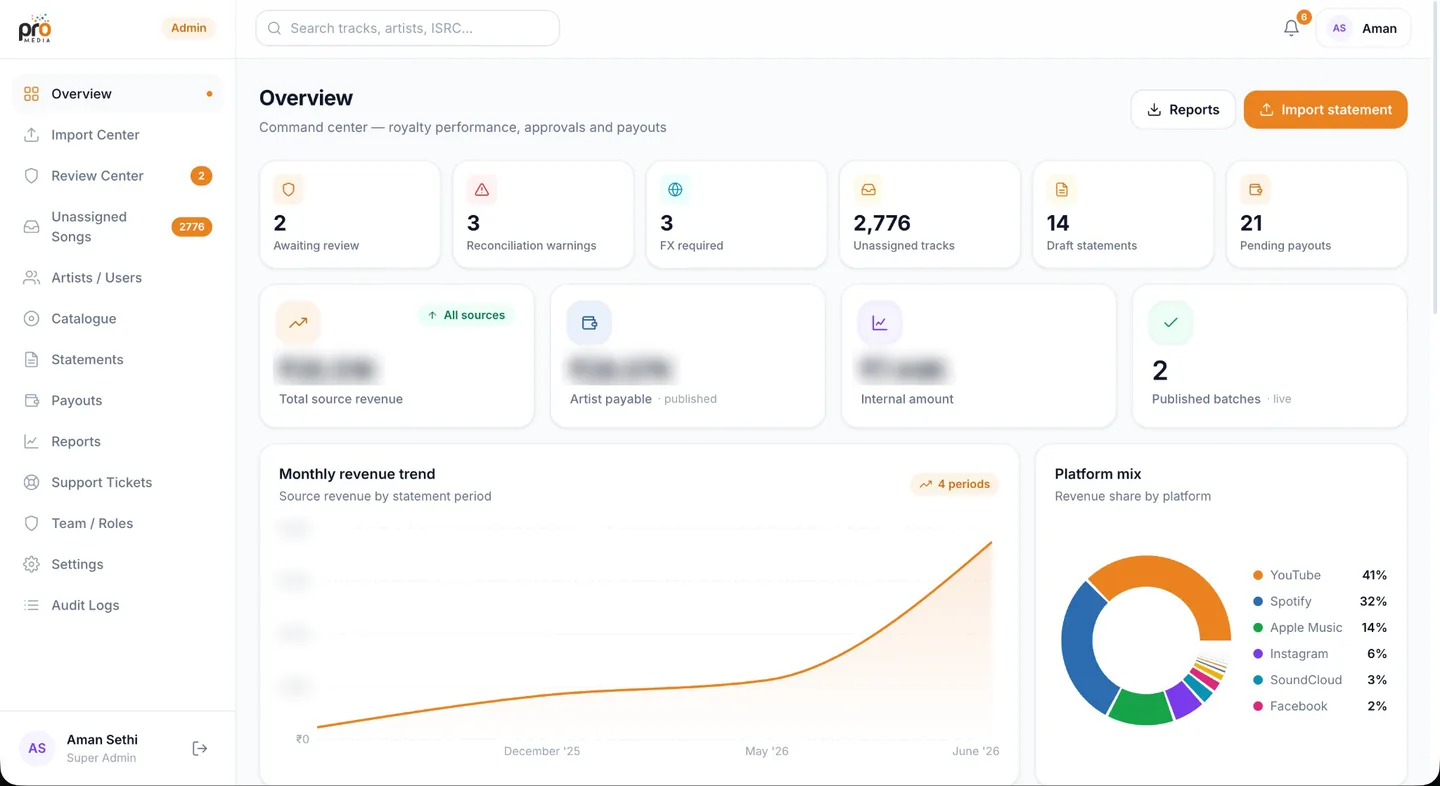
Branditify designed and built ProMedia’s royalty platform: an admin side that imports revenue statements, normalises them into one ledger, reviews and approves each batch, and publishes statements and payouts to artists, and an artist side that shows each artist their own numbers. Branditify’s 2026 Selected Digital Work lists it as a private product build under flagship software.
The same codebase carries ProMedia’s public entertainment website, so the brand fans see and the system artists are paid through come from one build.
What is ProMedia?
Pro Media Entertainment, a music media company that distributes its artists’ music, and the royalty platform it runs on.
What did Branditify build?
The royalty platform, admin and artist sides, the public entertainment website in the same codebase, and a revenue dashboard with client-approved artist presentations.
Who uses it?
Four roles: super admin, finance and support on ProMedia’s side, and artists, who only ever see their own ProMedia-branded numbers.
The project at a glance
- Client
- ProMedia (Pro Media Entertainment)
- Category
- MusicTech · royalty operations
- Project type
- Royalty operations platform
- Delivered
- Platform design and build
- Roles
- Super admin · Finance · Support · Artist
- Portfolio line
- “From streams and statements to artists and payouts.”
From raw statement to artist payout
Every statement takes the same road
A statement becomes a payout in stages. The first five happen out of sight, on the admin side; artists meet the result at the end.
Admin side, out of sight
Import
CSV, TSV and Excel statements, multi-sheet, into the import centre.
Normalise
Every source into one ledger, converted per import to rupees.
Review
Each batch checked by finance, then approved by a super admin.
Map by ISRC
Tracks matched to artists; new mappings are remembered.
Catalogue
Each artist’s tracks, kept in one place.
What artists meet
Statement
A branded statement per artist, as a PDF.
Payout
Pending, paid or on hold, per artist.
Reports
Revenue by period, platform and territory.

What are statement imports?
The monthly revenue statements ProMedia receives, loaded into the import centre as CSV, TSV or Excel files, including multi-sheet ones, and read into one ledger.
What does reconciliation mean in this platform?
Making an imported statement payable: rows normalised into one ledger, other currencies converted for that import, warnings raised for anything that does not add up, and each batch reviewed by finance and approved before anything is published.
How does ISRC mapping fit the workflow?
Every recording has an ISRC code. Imported tracks are matched to artists by ISRC, and tracks the platform cannot match wait in an unassigned queue until someone maps them, after which the mapping is remembered for future imports.
Two sides of one ledger
What the team sees, and what artists see
The platform keeps the operating detail on the admin side and gives artists a clean view of their own music. The two screens are from the revenue dashboard Branditify also built for ProMedia: a private operator view, and presentations made from client-approved display values.
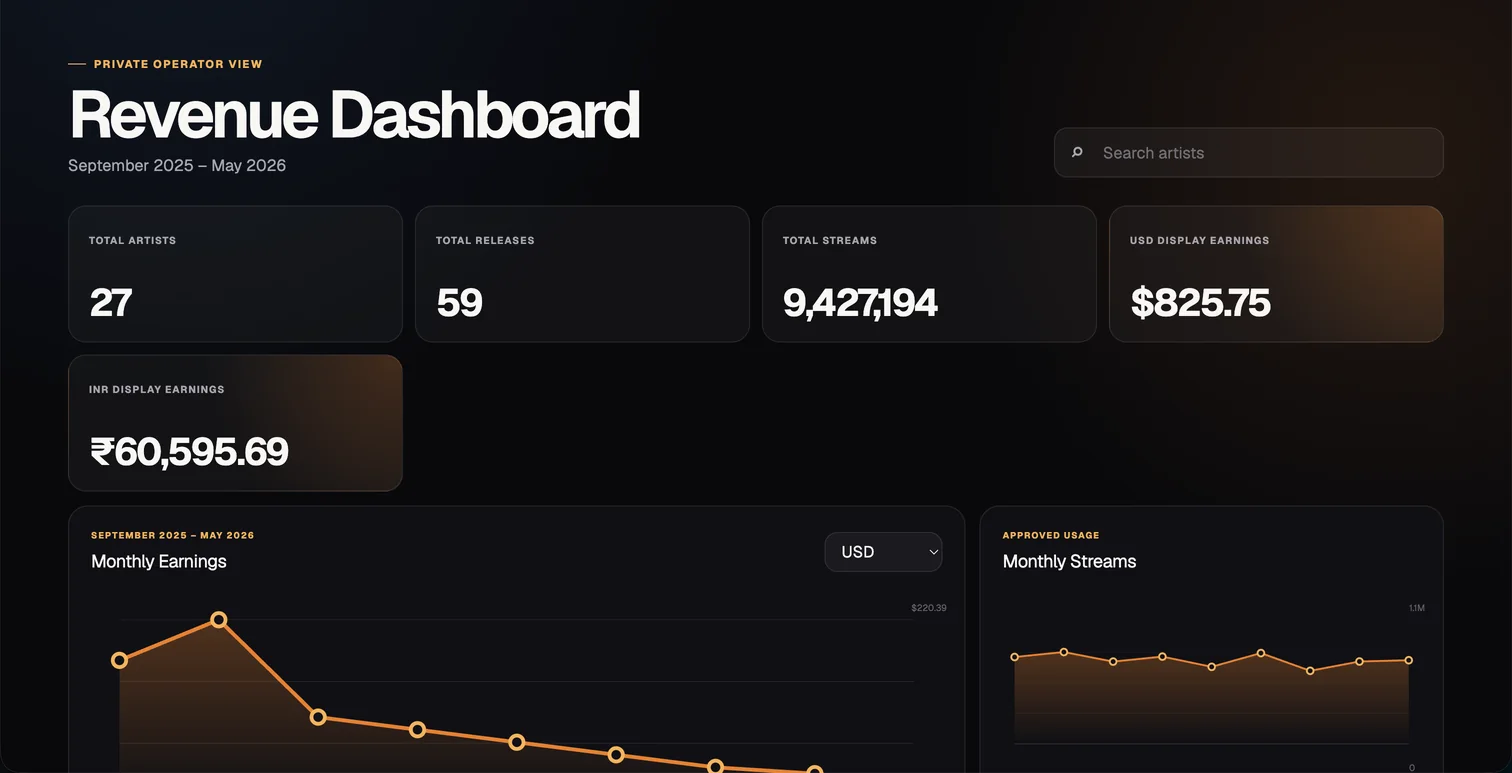
Admin side
- Import and review centres
- Unassigned tracks and ISRC mapping
- Catalogue, statements and payouts
- Reports, notifications and audit logs
- Team roles and settings
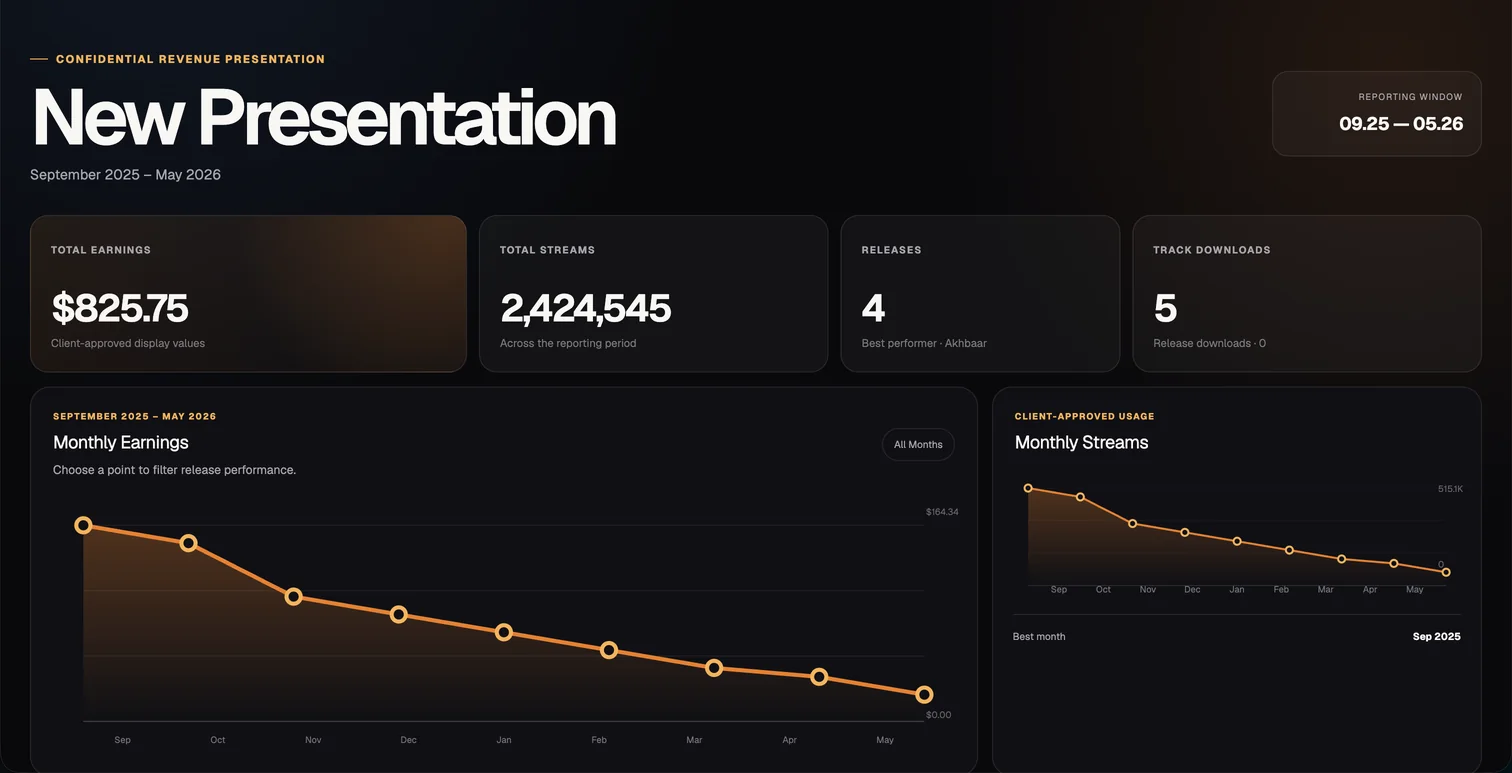
Artist side
- Revenue over time
- Tracks, platforms and territories
- Statements as PDFs
- Payments and support
- Never a source name or an internal figure
How are artist catalogues represented?
Each artist has a catalogue of their tracks, linked by ISRC, so imported revenue lands against the right releases.
How are statements prepared?
Once a batch is approved, the platform prepares a branded statement for each artist, generated as a PDF on the server, and publishes it to the artist’s dashboard.
How do payouts fit the system?
Payouts follow published statements and are tracked per artist as pending, paid or on hold. The platform records the payout; it is not a bank.
What does revenue reporting show?
Revenue over time by statement period, by platform and by territory, for the team across the catalogue and for each artist across their own music.
What Branditify delivered
The platform, designed and built
Everything on this list is part of the ProMedia platform.
- The import centre for multi-source revenue statements
- Normalisation into one ledger, with per-import currency conversion
- The review centre, with a finance and super-admin approval
- ISRC mapping and the unassigned-tracks queue
- Catalogue, branded PDF statements and payout tracking
- The artist dashboard, reports, notifications and audit logs
- A revenue dashboard with a private operator view and client-approved presentations
- ProMedia’s public entertainment website
Did Branditify build the public entertainment experience too?
Yes. ProMedia’s public entertainment website lives in the same codebase as the royalty platform.
Which Branditify Products does ProMedia genuinely prove?
One: Dashboards. ProMedia’s command centre and artist dashboards are role-based reporting over the platform’s own ledger, which is what that Product builds.
Which Service does ProMedia prove?
Custom Software.
Does ProMedia map to a Branditify Industry?
Not to one of our current Industry pages. It is a music media company.
Related at Branditify
Where this work fits
More product work
Other products built around one loop
Questions
About this project
What is ProMedia?
Pro Media Entertainment, a music media company, and the royalty platform it runs on.
What did Branditify build?
The royalty platform, admin and artist sides, and the public entertainment website.
Do artists see where their revenue came from?
They see platforms and territories; the statement sources behind them stay on the admin side.
Which Branditify pages relate to this project?
Custom Software and the Dashboards Product.
Start a project
Paying people from statements you have to clean first?
Tell us where your statements come from and who you pay, and we will reply with how we would build the flow between them.