
Custom software development
Software built around how your business actually works.
We design and build the systems a business runs on — CRM, operations, client portals, dashboards, internal tools and full SaaS products. Built around your workflow, not the other way round.
- Replaces spreadsheets and disconnected tools
- Web, mobile and admin from one team
- Your data, your code, your accounts
What is custom software?
Custom software is built around your workflow instead of asking your workflow to fit an existing tool.
An off-the-shelf product is designed for the average of thousands of businesses. It is fast to start and it fits most of what you do — until the part that makes you money turns out to be the part it does not cover. Custom software starts from your process: the steps your team really takes, the rules that really apply, and the data you really need out the other end.
Two of the five steps have nowhere to live, so they leave the system. Everything downstream is re-keyed by hand.
Every step is in the system, so the last one stops being a job and becomes a query.
What we can build
Most builds start from one system and grow outward.
Grouped by what the software is for, because that is how the question usually arrives — you know the problem before you know what the category is called. The dark block in each band is the system a build normally starts from; the modules beside it are what it grows into.
The systems that carry daily operations.
Run the business
ERP & operations
The spine most operations builds grow from — production, procurement, stock and dispatch in one place.
Production planning · Procurement · Stock · Dispatch · Costing
The systems your revenue passes through.
Win and keep customers
CRM & sales systems
Pipeline, ownership and follow-ups shaped to how your team actually sells, rather than to a template.
Pipeline · Quotes · Follow-ups · Territories · Targets
See the productThe layer that turns the first two into decisions.
See it and automate it
Dashboards & analytics
One number everyone agrees on, drawn from the systems above rather than rebuilt each month.
Live KPIs · Saved views · Scheduled reports · Drill-down · Exports
Illustrative Branditify UI
Five surfaces of one system.
The same design system, composed differently for each job. This is our own demonstration interface — not a client product, and not a template we resell.
Ownership, stage rules and follow-up dates that actually fire.
Where it gets used
The same system, shaped by the sector.
A hospital and a factory both need scheduling, records and billing. What differs is what a record is, who is allowed to change it, and what has to happen before money moves. That is the part a custom build gets right.
Automotive has no matching dedicated page yet, so it carries no link.
Healthcare
Appointments, patient records, billing and lab workflows in one place.
- 01Appointment
- 02Patient record
- 03Consultation
- 04Lab / imaging
- 05Billing & claim
Modules a build here usually carries
- Scheduling
- Records
- Roles & consent
- Lab orders
- Insurance billing
Education
Admissions through to attendance, fees and results.
- 01Enquiry
- 02Admission
- 03Attendance
- 04Assessment
- 05Fees & receipts
Modules a build here usually carries
- Admissions
- Timetable
- Attendance
- Gradebook
- Fee collection
Hospitality
Reservations, orders, stock and the guest record behind them.
- 01Reservation
- 02Table / room
- 03Order
- 04Stock draw
- 05Bill & feedback
Modules a build here usually carries
- Reservations
- POS
- Inventory
- Guest CRM
- Reporting
Professional services
Matters, documents, time and billing, with the audit trail intact.
- 01Enquiry
- 02Engagement
- 03Work & documents
- 04Time capture
- 05Invoice
Modules a build here usually carries
- Client records
- Matters
- Documents
- Timesheets
- Billing
Real estate
Leads, inventory, site visits and bookings that agree with each other.
- 01Lead
- 02Site visit
- 03Negotiation
- 04Booking
- 05Payment schedule
Modules a build here usually carries
- Lead routing
- Inventory
- Visit scheduling
- Booking
- Collections
Retail & D2C
Catalogue, orders, stock and returns across every channel you sell on.
- 01Catalogue
- 02Order
- 03Pick & pack
- 04Dispatch
- 05Return / refund
Modules a build here usually carries
- Catalogue
- Order management
- Inventory
- Fulfilment
- Returns
Manufacturing
Production, materials, procurement and dispatch on one plan.
- 01Sales order
- 02Production plan
- 03Material issue
- 04QC
- 05Dispatch
Modules a build here usually carries
- Planning
- BOM
- Procurement
- Quality
- Dispatch
Logistics
Consignments, fleet, routes and proof of delivery.
- 01Booking
- 02Allocation
- 03In transit
- 04Delivery
- 05POD & invoice
Modules a build here usually carries
- Consignments
- Fleet
- Routing
- Tracking
- POD
Automobiles
Workshop jobs, parts, service history and the dealer pipeline.
- 01Enquiry / job card
- 02Estimate
- 03Parts issue
- 04Work & QC
- 05Delivery & invoice
Modules a build here usually carries
- Job cards
- Parts inventory
- Service history
- Dealer CRM
- Warranty
No dedicated page for this sector yet.
Industry pagesHospitalsSchoolsHotels & resortsCA & accounting firmsReal estate developersFashion & apparelManufacturing & industrialLogistics, transport & fleet
Build or buy
Should you build custom software, or buy an existing tool?
Buy when your process is ordinary and speed matters more than fit. Build when the way you work is the thing that makes you money, and no product on the market can hold it without workarounds.
Most businesses need both. The useful question is not which is better — it is which parts of your operation are standard enough to rent, and which parts are yours.
Buy an existing tool when
- The workflow is common to your whole sector
- Requirements are standard and unlikely to move
- Integrations are light — one or two systems
- Speed to start matters more than exact fit
- The customisation you need is cosmetic
A good product bought well is cheaper and faster than a build, and there is no shame in it.
Build custom when
- The workflow is specific to how you make money
- Several tools hold parts of one process and none of them talk
- People spend real hours re-keying, chasing or reconciling
- Roles, approvals and rules are particular to your business
- The data has to stay connected end to end
- Your team has invented workarounds to make software cooperate
The signal is not ambition. It is the number of hours a month your team spends compensating for the tools.
If two or three of the build signals are true, a custom system usually pays for itself. If none are, buy the tool.
One system, several front doors
Software is rarely one screen.
A custom build usually grows more than one surface, and they share the same data and the same rules underneath. What changes is who is looking and what they are allowed to do.
- Internal web appYour teamThe admin where the work actually happens — records, queues, approvals, reporting.
- Client portalYour customersA logged-in space showing only their orders, documents and invoices.
- Mobile appCustomers or field teamsiOS and Android for the jobs that happen away from a desk.App development
- API layerYour other systemsThe interface accounting, logistics or a partner platform reads and writes through.
Integrations
Your new software should not become another isolated tool.
Most builds sit in the middle of systems you already pay for. We design around their APIs rather than asking you to abandon them.
If it has an API, we can usually design around it. Where a system has no API, we look at scheduled imports, file drops or a database view before we suggest replacing it.
Messaging
- WhatsApp BusinessOrder updates, reminders, OTPs
- Email & SMSTransactional mail and alerts
Payments
- RazorpayCollections, links, subscriptions
- StripeInternational card payments
Business systems
- AccountingInvoices and ledgers, in sync
- Existing CRMKeep the CRM your sales team knows
- SpreadsheetsImport what already lives in Sheets or Excel
Data & platform
- Your databaseRead from what you already store
- Cloud & storageHosting, files, backups
- AIAI providersClassification, drafting, search
Named to show what these systems are for. Branditify holds no partnership or certification with any of them.
AI, in its place
AI is a component, not the product.
Yes — AI can be added to a custom system, either at the start or later. It works best on the parts of a workflow that are repetitive and language-shaped: reading documents, sorting incoming work, drafting a first version, answering a question from your own records.
Where a decision carries money, safety or a legal consequence, a person stays responsible for it. AI drafts and sorts; your rules and your people decide.
AI agents & automation- 1What comes inAn email, a form, a PDF, a message
- 2The model reads itExtracts, classifies or summarises
- 3Your rules decideThresholds, routing, who approves
- 4The system actsCreates a record, notifies, drafts a reply
Where it earns its place
- Document extraction — invoices, forms, contracts
- Classification and routing of incoming work
- Summarising a long record before a call
- Search across your own documents and history
- Drafting replies a person then approves
- Flagging the exceptions worth a human look
Ownership, control and safety
You should end up holding the thing you paid for.
Ownership & control
- Code and project assets
- Handed over at the end of the engagement, in a repository you control.
- Accounts
- Hosting, database and third-party accounts are set up in your name wherever the vendor allows it.
- Admin access
- You hold the top-level admin. We do not keep a private back door.
- Documentation
- What was built, how it is deployed, and what each environment is for.
- Future development
- You can continue with us, with your own team, or with someone else.
- After launch
- A support window, then an agreed maintenance arrangement if you want one.
Security & data
- Authentication
- Designed with session handling and password rules appropriate to the system.
- Roles and permissions
- Access is scoped by role — people see the records their job needs.
- Environments
- Development and production kept separate, with separate data.
- API design
- Authenticated endpoints, server-side validation, least privilege by default.
- Backups
- Scheduled backups on the database, with a restore that has been tested.
- Logging
- An audit trail on the actions that matter — who changed what, and when.
How it runs
You see something working early.
Most builds take eight to twenty weeks depending on how many modules and integrations are in scope. You see a clickable prototype in the first few weeks, and working software long before launch.
Feedback happens at the prototype and at each module review. Changing a screen at prototype costs a conversation; changing it after launch costs a release.
Scope and cost
What affects custom software cost?
Cost follows scope, and scope is mostly a count: how many modules, how many roles, how many systems it has to talk to, and how many platforms it runs on. A single-module internal tool and a multi-tenant SaaS product are different orders of magnitude.
We quote against a scoped brief rather than a page of ranges, because a range that ignores your integrations is not useful to either of us.
- ModulesHow many parts of the business the system coverslarge effect
- User rolesHow many kinds of user, and how different their permissions aremoderate effect
- IntegrationsEach external system is design, build and error handlinglarge effect
- PlatformsWeb only, or web plus iOS and Androidlarge effect
- Data migrationHow much history moves in, and how clean it ismoderate effect
- AutomationRules, approvals and scheduled jobs behind the screensmoderate effect
- AIWhether models sit inside a workflow, and how they are evaluatedmoderate effect
- TimelineCompressed delivery costs more than a sensible onesmall effect
- SupportWhat happens after launch, and for how longsmall effect
Proof
Software we have actually shipped.
Both are live case studies. Figures shown are the ones published on those pages.
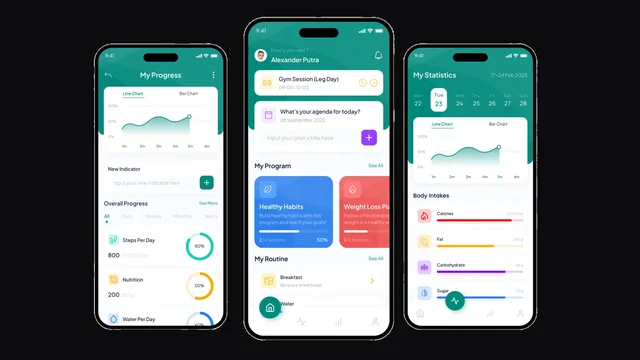 LeanTrackA health and fitness tracking mobile app — product design through to development, built around weight management, personalised insight and gamified progress.Mobile app development · UX/UI design · Product experience design · Gamified progress system
“Branditify helped LeanTrack become a cleaner, smarter, and more engaging health tracking app.”Founder, LeanTrackQualitative outcome only: the record reports a simplified health flow and a more engaging experience. No performance figure is published for this project.View case study Lotus ProfessionalA beauty ecommerce platform with AI-assisted skincare analysis, a product recommendation flow and a mobile-first experience.10,000+units sold10M+impressions1:5ROI
“Branditify helped Lotus Professional create a smoother and more personalized beauty eCommerce experience.”Anuradha, eCommerce ManagerView case study



Where to go next
If you already know the shape of it.
Questions
The things buyers ask us first.
What is custom software development?
Designing and building software around one organisation's workflow instead of adapting that workflow to a product built for the average of many. It usually covers the screens your team works in, the rules that govern them, and the data that comes out the other end.
When should we build instead of buy?
Build when the way you work is specific to how you make money, when several tools each hold part of one process and none of them talk, or when people spend real hours re-keying and reconciling. If your process is ordinary and speed matters most, buy the product.
Can you replace spreadsheets and manual workflows?
That is the most common reason people come to us. The usual pattern is a shared sheet plus a WhatsApp group plus one person who knows how it all fits together. We map that as it really runs, then build the system it should have been.
Can you integrate our existing systems?
Usually. If a system has an API we design around it, so your accounting, CRM or logistics platform keeps working. Where there is no API we look at scheduled imports, file exchange or a read-only database view before suggesting a replacement.
Can you migrate our existing data?
Yes, and it is worth scoping properly. Migration is rarely a straight copy: history is usually incomplete, duplicated or shaped for a different system. We agree what moves, what gets cleaned and what stays in the old system as an archive.
Can the system include a mobile app?
Yes. A custom build often grows several surfaces on the same data — an internal web app, a client portal, and iOS and Android apps for people working away from a desk. Adding a mobile app later is normal; it is easier when we know at the start.
Can AI be added later?
Yes. AI works best on the repetitive, language-shaped parts of a workflow — reading documents, sorting incoming work, drafting a first version, answering from your own records. It can be added once the underlying system is running, and where a decision carries money or legal weight a person stays responsible.
Who owns the code and project assets?
You do. Code and project assets are handed over in a repository you control, accounts are set up in your name where the vendor allows it, and you hold the top-level admin. You can continue with us, with your own team, or with someone else.
How is the cost decided?
By scope, which is mostly a count: how many modules, how many user roles, how many systems it integrates with, how many platforms it runs on, and how much data has to move. We quote against a scoped brief rather than publish a range that ignores your integrations.