
Booking & reservation systems
A booking system that only offers times you can actually keep.
A customer picks what they need.
The system works out what that requires.
Only the times that genuinely work are offered.
The slot is held while they finish.
Booked — and both sides know it.
On the day, it turns up on the right list.
And it finishes properly.
Not a time first — a service. Everything else follows from what that service actually takes.
Ninety minutes, one specialist, Room 2, and the gap you keep between bookings.
Two of seven survive. The rest are not hidden by luck — each one failed a rule you set.
So two people filling in the same form at the same time cannot both take 16:30.
The customer gets a confirmation. Your team gets a job with a time, a place and a person against it.
Not buried in an inbox. It is in front of whoever is doing the work, in the order it happens.
Completed, or not — either way the booking ends in a state you can count later.
What they asked for
- Consultation30 min
- Full session90 min
- Group class60 min · 12 places
So the system needs
- 90 minutesclear, in one block
- One specialistfree for the whole booking
- Room 2free for the whole booking
- 15 minutes afterthe gap you keep between bookings
Tuesday
Not checked yetNot checked yet2 of 7 work2 of 7 work2 of 7 work2 of 7 work2 of 7 work- 09:00CheckingRoom 2 is already booked
- 10:30CheckingSpecialist and room both free
- 12:00CheckingOnly 60 minutes before the next booking
- 13:30CheckingOutside the hours you set
- 15:00CheckingSpecialist is with someone else
- 16:30CheckingSpecialist and room both free
- 18:00CheckingNot enough time before closing
Illustrative interface · sample data
Branditify designs and builds custom booking and reservation systems for businesses whose availability depends on staff, rooms, equipment, capacity and duration — so customers only ever choose a valid time, your team sees what is due, and every booking reaches a finished state.
Where a form stops
A booking form takes a request. A booking system answers it.
Most websites collect a preferred date and time and email it to somebody. That is a request, not a booking — and every step after it costs one of your people their attention.
A form on your website
- 01Types a date and time they hope worksThe customer
- 02Nothing has been checked yetNobody
- 03Somebody opens a calendar by handOne of your people
- 04Nothing is holding that timeNobody
- 05Somebody replies to accept, or to re-offerOne of your people
- 06Written into the diary, if nothing slippedOne of your people
Three of these six steps need one of your people. On two more, nobody has checked anything at all.
Maybe a booking
A booking system
- 01Picks the service they actually needThe customer
- 02Staff, room, capacity and hours are all checkedThe system
- 03Only the times that work are shownThe system
- 04The slot is held while they finishThe system
- 05Confirmed to both sides at onceThe system
- 06On the right list, on the right dayThe system
None of them do. Your people are needed for the service, not the scheduling.
A booking, with a state
Real availability
Tuesday 3:00 PM is not available just because it is on a calendar.
Whether a time can be booked depends on what the customer asked for. The system asks the same questions a good receptionist would — in the same order, every time, without getting tired.
- 01The serviceWhat was actually booked, and how long it takes.A full session is 90 minutes. A consultation is 30. They cannot share one slot length.Full session · 90 minutesFull session · 90 minutes
- 02The personWhether someone who can do this work is free.Not anyone — someone qualified for that service, and not already committed at that time.The only specialist is booked until 16:15The specialist is free from 16:15
- 03The room or equipmentWhether the physical thing the service needs is free.A room, a chair, a bay, a machine, a vehicle. One service can need more than one of them.Room 2 is free from 14:00Room 2 is free until close
- 04The capacityHow many people can be in it at once.One-to-one services hold a single place. A class or a table holds several, and fills up.One-to-one · one place neededOne-to-one · one place needed
- 05The gap around itThe time you need before and after, that customers never see.Turnaround, cleaning, travel, notes, setup. Without it the day looks fine and runs late.15 minutes still to clear from the previous booking15 minutes cleared before it starts
- 06Your hoursWhen you are open, and when you are not.Opening hours, breaks, holidays, one-off closures, and hours that differ by location.Tuesday · 09:00 to 18:00Ends at 18:00 · inside your hours
- 07How far aheadThe warning you need, and how far forward you will take bookings.No same-hour bookings, or nothing more than sixty days out — whichever suits how you work.More than 2 hours aheadMore than 2 hours ahead
Two rules failed: nobody who can do this is free, and the gap after the previous booking has not cleared. It looks open on a calendar. It is not.
Every rule you set is satisfied, so this is a time the customer can actually be offered — and one you can actually keep.
Every one of these is a rule you set, and the system applies exactly those — the same way, every time a customer looks. Moving a booking or reassigning a person stays a decision your team makes.
Illustrative interface · sample data
One booking, both sides
Follow the same booking from the customer and from your team.
Most booking stories end at the confirmation screen. That is roughly halfway. The part that decides whether the system is worth having is what happens to the booking afterwards.
What the customer sees
- Full session · Tuesday 16:30
- Name, contact and anything you need to know beforehand
- What was booked, when, where and what to bring
- A link to their booking, if you want them to have one
- They move it themselves, if you allow that
- The new time is checked against the same rules
- A nudge before the appointment
- Sent on the channel you have connected
- The part the software is not doing
- Everything before this exists to make it happen on time
- What they booked, and when they last came
- The next booking starts from something you already know
What your team sees
- Assigned to a specialist and Room 2
- Visible on Tuesday before anything else is
- Tuesday now has a shape you can look at
- The 16:30 slot is gone from what customers are offered
- Same booking, new time — nothing is duplicated
- The old slot goes back into what can be offered
- Today, in order, with who is doing what
- Anything unassigned or unconfirmed is obvious
- Arrived, started, running late — whatever you need to track
- Notes and anything to record against the visit
- Completed, cancelled or no-show — never just blank
- Which is what makes the month countable at all
What the team sees is built around how you actually work — by day, by person, by location or by what still needs doing. It is a working list, shaped for whoever is doing the job.
Reporting across bookings, revenue and other systems is a dashboard project rather than a booking one.
Illustrative interface · sample data
Confirmations & reminders
Confirmations and reminders, on the channels you choose.
A booking system can send confirmations, reminders and updates. Which of those go out, and on which channel, is set up with you — each channel runs through a provider with its own setup and cost, so it is worth choosing deliberately.
What a confirmation should carry
- What was booked, and how long it takes
- When, and where — or how to join, if it is remote
- Who it is with, where that matters
- Anything they need to bring, send or do beforehand
- How to change or cancel it, if you allow that
Channels are connected to suit the project — email, SMS or WhatsApp, each through a provider account with its own setup and running cost. We work out which ones your case actually needs before anything is built.
Payments
Only if taking money at the point of booking is how your business works.
A booking is a commitment to a time. Whether money moves then, later, or in person is a decision about your business — and the system is built to match whichever way you work.
Where payment is part of the booking we connect a provider you already hold or choose to open, and the money moves through that provider directly to you. Deposits, refunds and any cancellation charge follow the rules your business sets.
Changes & your rules
Your booking rules are yours. The system just applies them the same way every time.
Every business draws these lines differently, and there is no correct answer we could print on a page. What a custom system gives you is that the line is held at 2am exactly as it is when you are standing there.
For each of these, you decide once:
- ReschedulingMoves it themselves from their confirmationAsks you, and you move it for themSees the new time, and the old slot returns to availabilityStays in control of every time that changes
- CancellingCancels up to the point you decideContacts you to cancelSees it cancelled, with when and by whomDecides what happens to the slot each time
- The slot they leaveSomeone else can book it straight awayCannot see it come back yetThe slot reopens without anyone rememberingChooses when it is offered again
- Who gets toldGets the update on the channel you connectedHears from you directlyAnd the assigned person is told tooDecides who needs to know, case by case
- Anything charged on a changeSees the rule you set before they confirm the changeTalks to you about itThe rule does the askingHandles it commercially, per customer
- Marking a no-showSees it on their own historyHears from you once it is settledHas it recorded once the time has passedMarks it when they know what happened
Fewer messages for your team, and the rules still hold — because the system is the one holding them.
Nothing changes without one of your people, and every change is still recorded against the booking.
Cancellation, rescheduling and any charge on a change follow the policy your business chooses. We build that policy in, make it behave the same way on every channel, and keep a record of who changed what.
Connections
A booking rarely wants to stay in one place.
A booking system earns its keep when the rest of your business can see the booking. What is possible depends on what the other system will let anything talk to.
- Staff calendarsSo a booking shows up where your team already looks.Where the calendar exposes an API or accepts invites.
- Your CRMSo a booking becomes part of the customer record, not a separate island.Where the CRM has an API — or if we built it, directly.
- Accounting or invoicingSo what was booked and what was billed agree.Where the tool offers an API or a structured export.
- Payment providerWhere taking money at the point of booking is part of the model.Through a provider account you hold.
- Your websiteBooking inside your own site, on your own domain, in your own brand.Built into the site you have, or the one we build.
- Messaging providersFor confirmations and reminders on the channels you connect.Each provider account and its cost is yours.
We check what each of your existing tools can actually expose — an API, a documented integration or a scheduled export — before defining the connection, so what gets promised is what your stack can genuinely support.
Your existing bookings
Your existing bookings come with you.
Most businesses arrive with bookings already made and customers already known. Those come with you, as far as what you hold allows.
What you have today
- A spreadsheet of upcoming bookings
- A shared calendar
- Customer contacts from your current tool
- A paper diary, typed up
- An export from a booking tool you are leaving
- 01ReadWe look at what you actually have, not what it should have been.
- Found
- Upcoming bookings, customers, services
- Missing
- Named on the spot, not guessed
- 02MapYour columns become services, people, rooms and times.
- Mapped
- Service, duration, resource, customer
- Decided with you
- Anything ambiguous
- 03CheckClashes and impossible times surface before they go in, not after.
- Flagged
- Overlaps, past dates, unknown services
- Confirmed with you
- Every correction stays your call
- 04LoadIt goes in as real bookings, with the original kept alongside.
- Loaded
- As bookings with a state
- Kept
- The source file, unchanged
- Customer
- Linked, not retyped
- Resource
- Specialist · Room 2
- State
- Confirmed
What moves across depends on what your current tool can export. We check that at the very start, so you know exactly what comes with you before the build begins.
Who sees what
Not everyone who touches a booking should see everything.
Roles are decided with you, and they are usually more specific than "admin" and "everyone else".
Access is designed per project and enforced in the system rather than by convention. Security and compliance requirements are scoped per project. No certification or compliance standard is implied unless expressly included in the agreed scope.
Where people actually use it
A browser-based system works on every device with nothing to install, and updates for everyone at once. Where an app genuinely adds something, it is scoped as its own project. App development
Different shapes
The word "booking" means something different in every business.
The reason an off-the-shelf tool so often nearly works is that booking is not one problem. Each of these is an example of how differently the same system has to behave.
Each of these is a booking shape a custom system handles well. Yours will have its own — working that out is what the first conversation is for.
Scope & cost
What actually decides the size of a booking project.
A single service with one person taking bookings is a small build. A system that has to be right across locations, resources and rules is not. Find yourself on each of these and you will know roughly which end you are at.
- 01How complicated availability isOne calendar, one kind of appointmentStaff, rooms, equipment, capacity and buffers all interacting
- 02How many services and rulesA handful of services that behave the same wayMany services, each with its own duration, resources and rules
- 03Locations and teamsOne place, one team, one set of hoursSeveral locations with different hours, staff and resources
- 04What the team side has to doA clear list of what is dueA full working surface a front desk lives in all day
- 05What it has to connect toIt stands on its ownCalendars, CRM, accounting and payments, each checked first
- 06What comes with youStarting freshExisting bookings, customers and history moved in cleanly
No two of these move together, which is why a booking project is scoped before it is priced rather than the other way round.
Straight answers
The questions people actually ask before starting one of these.
- What is a custom booking system?
- It is booking software built around how one business actually works, rather than a subscription tool you adapt to. It holds your services, your people, your rooms and equipment, your hours and your rules, and it decides what a customer can book from those. Branditify builds it, you own it, and it does what your operation needs rather than what a product roadmap allows.
- When is a booking form enough, and when is it not?
- A form is fine when any time you are open will do, one person handles everything, and the volume is low enough that replying by hand is not a burden. It stops being enough the moment availability depends on more than one thing — a specific person, a room, a piece of equipment, a limit on numbers — or the moment somebody is spending real time confirming bookings by hand.
- How does the system decide a time is available?
- It tests that time against the rules the service requires: how long it takes, whether someone who can do it is free, whether the room or equipment is free, whether there is space left, whether the gap you need before and after has cleared, whether you are open, and whether it is far enough ahead. A time is offered only when every one of those passes.
- What does the customer actually do?
- They pick a service, they are shown only times that genuinely work, they choose one, they give you the details you need, and they get a confirmation. The slot is held while they finish so nobody else takes it mid-form. On a phone this is usually four screens, and it is designed to be finished in one sitting.
- What does our team see once a booking is made?
- A working list rather than an inbox: what is due today, in what order, with who it is assigned to and anything that still needs attention. Bookings can be moved, reassigned and closed from there, and each one ends as completed, cancelled or a no-show — which is what makes it possible to count anything later.
- What happens when a booking has to change?
- The same booking moves rather than a second one appearing. The new time is checked against exactly the same rules as the original, the slot that was given up goes back into availability, and whoever you have decided should be told is told. Whether the customer can do that themselves, and up to what point, is your rule and the system holds it.
- Can the booking system be part of a larger business platform?
- Yes. Booking covers availability, reservations and the journey around a scheduled service. Where your operation also needs customer records, service workflows, internal tools or reporting, those sit alongside the booking layer inside a wider custom system — scoped around how the business actually runs rather than forced into the booking layer. Branditify builds both, and the first conversation works out which parts you need.
- What does starting a booking project involve?
- A conversation about how you take bookings now, what your availability really depends on, and which of your rules are firm. From that we can tell you what the build actually is, what it needs to connect to, what is realistic to move across, and what it will cost. We scope the availability rules first, because that is the part that decides the size of the work, and the quote follows from it.
If you are still deciding which system you need, or how a custom build works in general, these are the better places to start.
Selected work
The booking flow, built in practice.
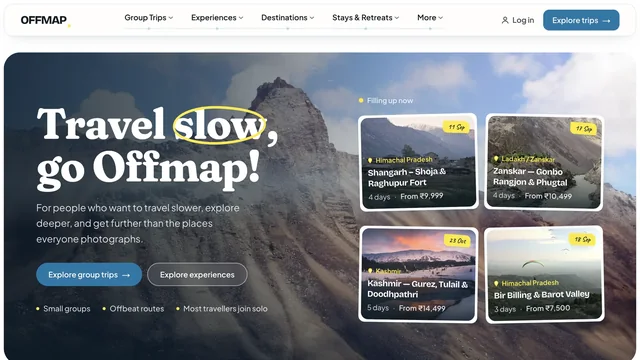
OFFMAP is an approved Branditify case whose own record names this system: departures, availability and a booking journey delivered end to end.
Questions
Booking questions, answered plainly.
- How is a custom booking system different from a booking form on our website?
- A form collects a request and emails it to somebody, who then checks a calendar and replies. A booking system checks availability itself, offers only times that work, holds the slot while the customer finishes, and confirms it to both sides at once. The difference is whether a person has to be involved for every single booking.
- Can availability depend on staff, rooms, equipment or capacity?
- Yes, and that is usually the reason to build one. A service can require a specific qualified person, a particular room, a piece of equipment, or several of these at once, and a time is only offered when everything it needs is genuinely free. Capacity is handled too, so a class or a table can hold several bookings until it is full.
- Can different services have different durations and booking rules?
- Yes. Each service can carry its own length, its own resource requirements, its own buffer before and after, its own notice period and its own limits on who can book it. That is a normal part of the scope rather than an extra, because almost no real business has services that all behave the same way.
- Can customers reschedule or cancel their own bookings?
- They can if you decide they should. Whether self-service changes are allowed, up to what point before the appointment, and what happens to the slot afterwards are all your rules — and the system applies them consistently. Cancellation and rescheduling rules follow the policy your business chooses, and we build that policy in.
- Can we take payments or deposits when someone books?
- Yes. Payments can be part of the booking flow where taking money at reservation time fits how your business works, and equally a booking can simply hold the time with payment handled later or in person. Where payment is included we connect a provider you hold or choose, and the money moves through that provider directly to you. Deposits, refunds and any charge on cancellation follow the rules you set.
- What reminders can the system send?
- Confirmations, reminders and updates can go out by email, SMS or WhatsApp, and staff can be notified inside the system itself. None of these is automatic or included: email needs a sending service on your domain, SMS needs a provider account and is charged per message, and WhatsApp needs an approved business sender and message templates. We work out which ones you actually need before anything is built.
- Can it connect to our CRM, calendar or accounting software?
- It can connect to anything that exposes an API, a documented integration or a usable export, which covers most mainstream calendars, CRMs and accounting tools. We check what your specific tools allow at the start, so the connections in the plan are the ones your stack can genuinely support.
- Can we move our existing bookings and customer list into it?
- Usually yes. Upcoming bookings, customers, services and history can be brought across from a spreadsheet, a calendar or an export from the tool you are leaving. We read what you actually have, map it with you, flag clashes and impossible dates for you to confirm, and keep the original file alongside. What moves across depends on what your current tool can export, and we check that at the start.
- Does it work on mobile, and do we need a separate app?
- It is built mobile-first, because most bookings are made on a phone, and the staff side works on a tablet or a desk browser. It runs in the browser, so it works on every device with nothing to install and updates for everyone at once. An app is worth adding when there is a real reason for one, and that is scoped as its own project.
- Who owns the booking system and the booking data?
- You do. The system is built for your business, the source code and the data belong to you, and your bookings and customers are yours to export at any time. This is a custom build, not a licence to a Branditify product, so there is no subscription that holds your data hostage if you stop working with us.
Explore next
Where a booking system usually sits.
Bookings are rarely the only system a business runs. These are the ones that most often sit next to it.
See selected Branditify work Companies Branditify has worked with